 Winners - Best Business Broadband Provider & People's Choice - Broadband 2025

Moving to Hyperfibre? What Your Business Needs to Prepare
So, you’ve decided to upgrade your business to Hyperfibre? Awesome! Hyperfibre can give you significantly more internet capacity, particularly if your team relies heavily on cloud applications, video meetings, online backups or large file transfers. Now with Voyager Business Hyperfibre available in more regions than ever, and with plans graduating from 1Gbps to 4Gbps, adoption is more achieveable for many NZ businesses.
But there’s an important point to note: upgrading the internet connection doesn’t mean the rest of your business is set-up to keep up with your new connection.
Before moving to Hyperfibre, you need check whether your router, network switches, Ethernet cabling, Wi-Fi and important devices can handle multi-gigabit speeds. You should also check Hyperfibre availability and allow time for installation if new equipment is required at your premises.
A little preparation can help make sure your business actually gets the benefit of the faster connection, and doesn’t experience any lag in the changeover of critical business functions to a new connection.
Why preparing for Hyperfibre matters
Think of your business internet connection as one part of a chain.
Your Hyperfibre connection might be capable of 2Gbps or 4Gbps, but traffic still needs to travel through your router, switches, cabling and Wi-Fi before reaching your laptop or other device.
If one part of that chain is limited to 1Gbps, an individual connection passing through it isn’t going to run at the full 2Gbps or 4Gbps.
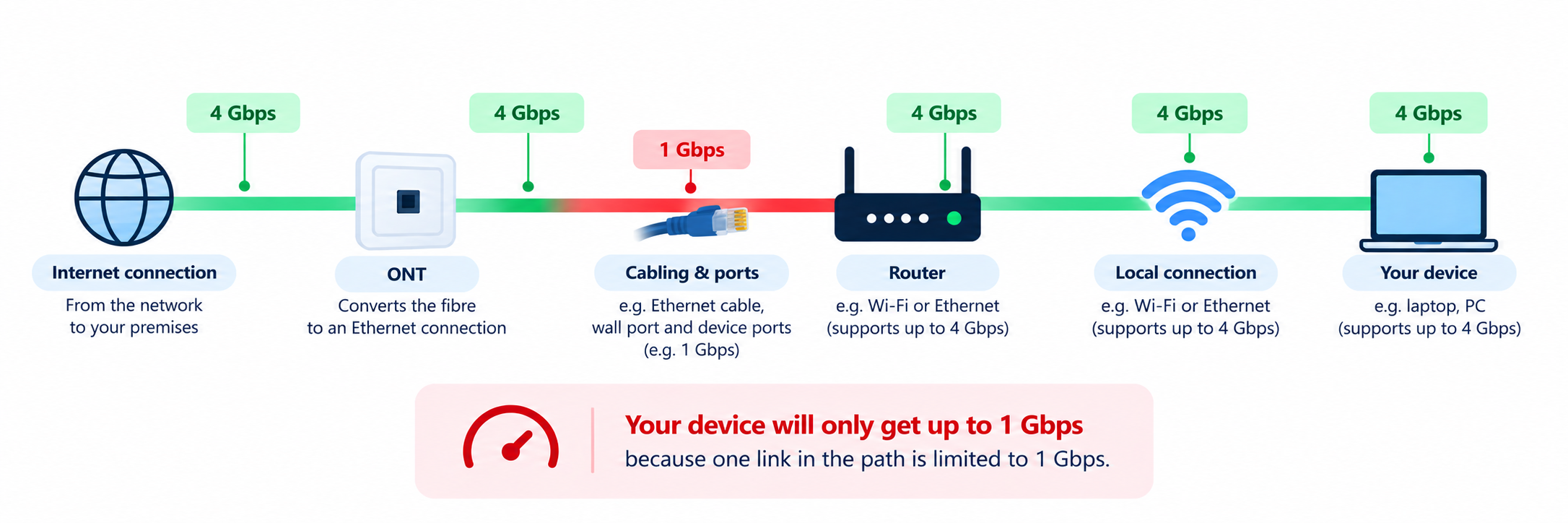
That doesn’t necessarily mean you need to replace everything in the office. One of the main benefits of Hyperfibre is having significantly more bandwidth available for many users and applications at the same time.
It does mean it’s worth understanding where the bottlenecks are before you upgrade.
Your pre-Hyperfibre checklist
Before making the move, work through these six areas.
1. Check whether Hyperfibre is available at your address
Hyperfibre availability depends on your business location, so check your address before planning the rest of the upgrade. If it’s available, find out whether your premises already has the equipment required for a Hyperfibre connection such as your Optical Network Terminal (ONT) (Most common Chorus ONT’s shown in images below for comparison).
If your current ONT needs to be replaced, a visit from a technician from the relevant local fibre company may be required. Allow for this when planning your upgrade rather than assuming the service can be switched on immediately.
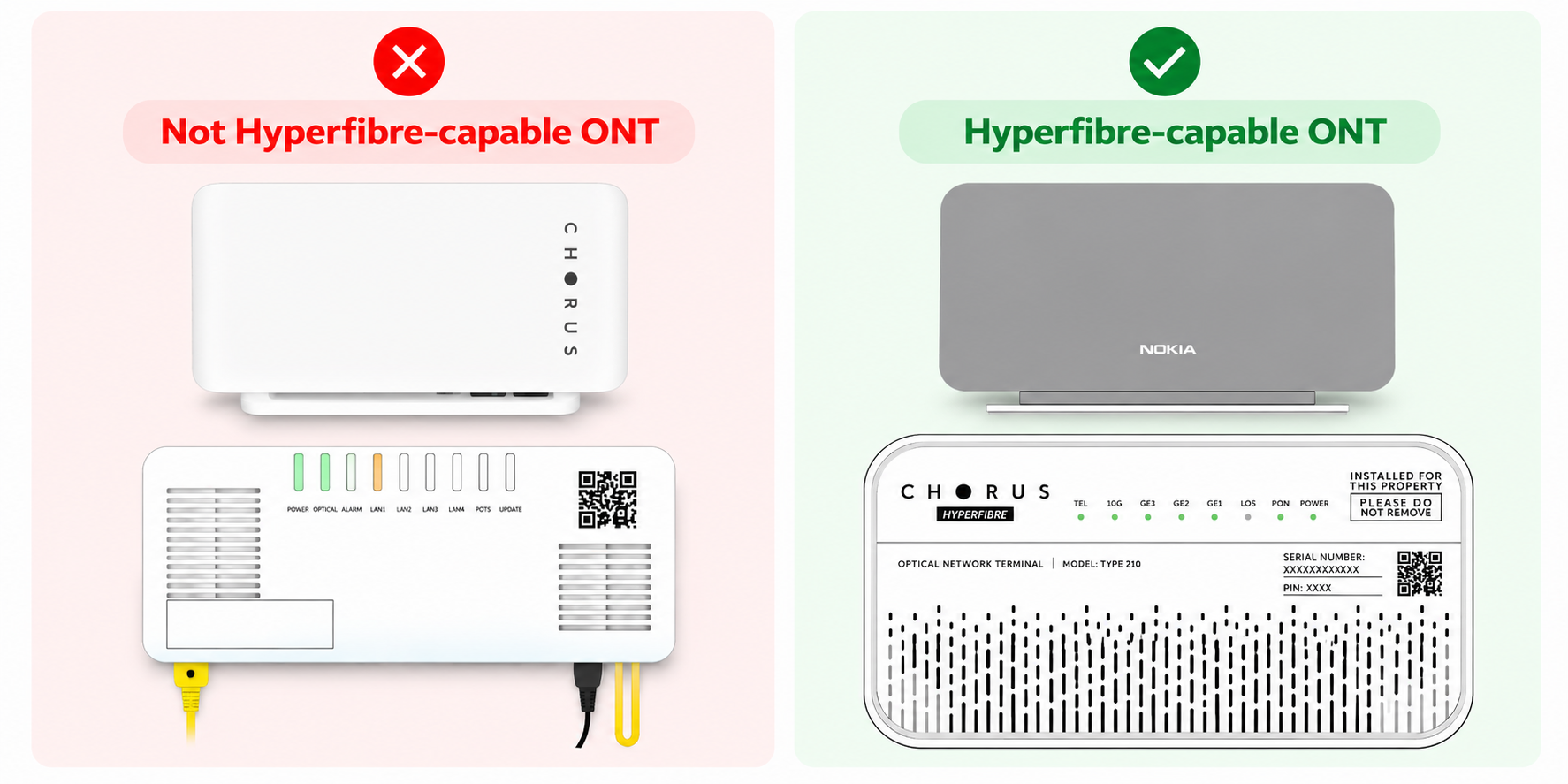
Details on Hyperfibre Tutahi First Fibre ONT’s can be found here and Hyperfibre Enable ONT’s can be found here.
2. Check your router
A router that has worked perfectly well with standard fibre may become a bottleneck on a multi-gigabit connection as we described above. The key thing to look at is the speed of its ports. See here an image of our eero 7 and eero Max 7 Hyperfibre capable routers as an example below.
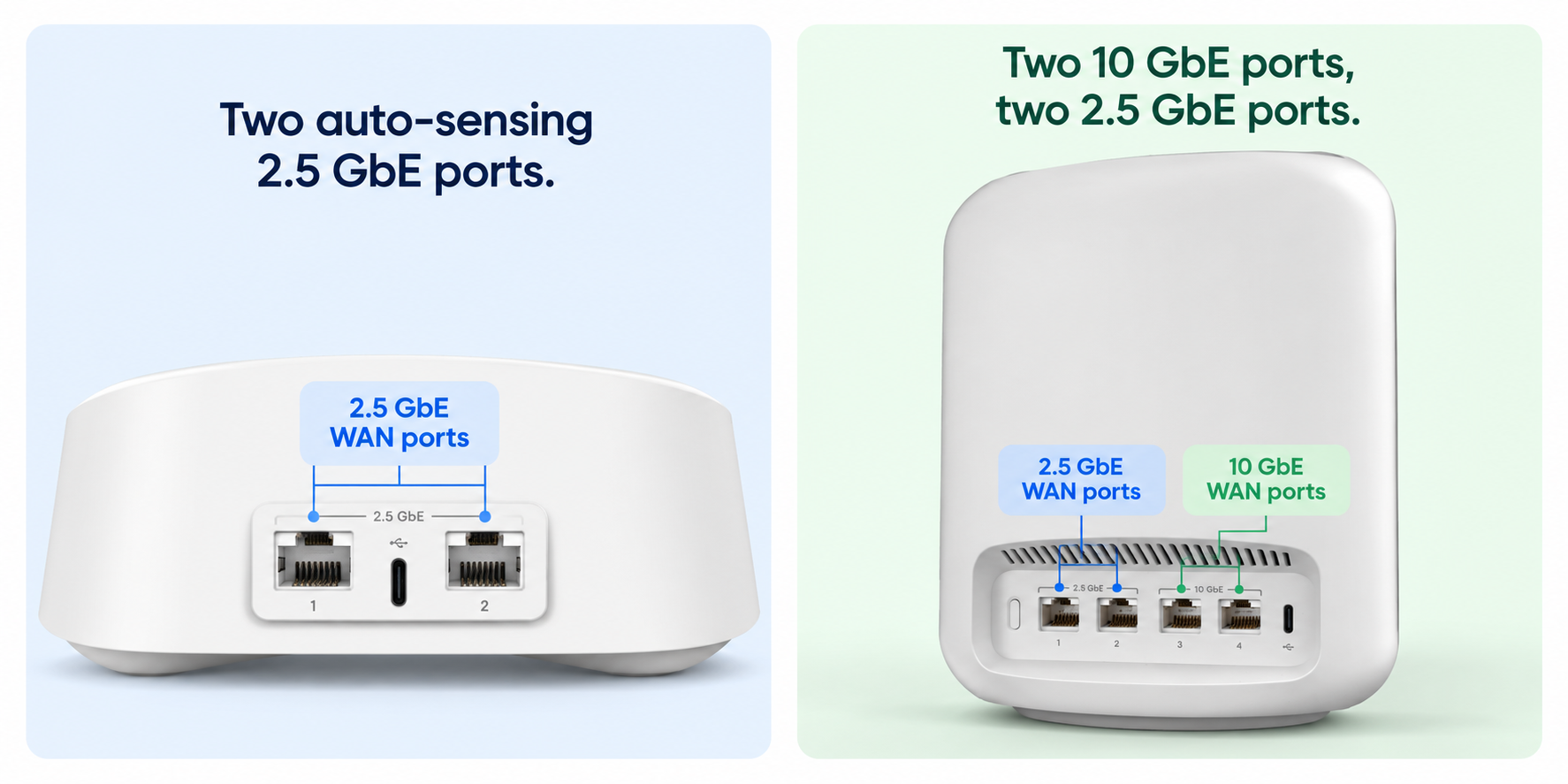
For Business Hyperfibre plans, you’ll typically want a router designed for multi-gigabit connectivity, with WAN and LAN ports capable of supporting the speeds you intend to use.
For example, a router with 1Gbps Ethernet ports will limit an individual wired connection to around that interface’s maximum capacity, regardless of how much bandwidth your Hyperfibre service provides (say 2Gbps).
Also think about what happens after the router. Having a fast WAN port isn’t much help if every connection leaving the router is restricted by slower hardware.
What to check:
- Is the router designed for multi-gigabit internet?
- What speed is its WAN port?
- What speed are its LAN ports?
- Does it support the Wi-Fi standard your business needs?
- Can it handle the number of users and devices in your workplace?
Voyager offers Hyperfibre-capable eero routers, so businesses that aren’t sure about their existing hardware can discuss this as part of planning their upgrade (learn more here).
3. Look at your network switches and Ethernet cabling
For many businesses, this is where a bit more investigation is worthwhile.
If your office uses network switches to connect PCs, access points, servers, phones and other equipment, check what speeds those switches support. See below an example of a network switch we offer here at Voyager.
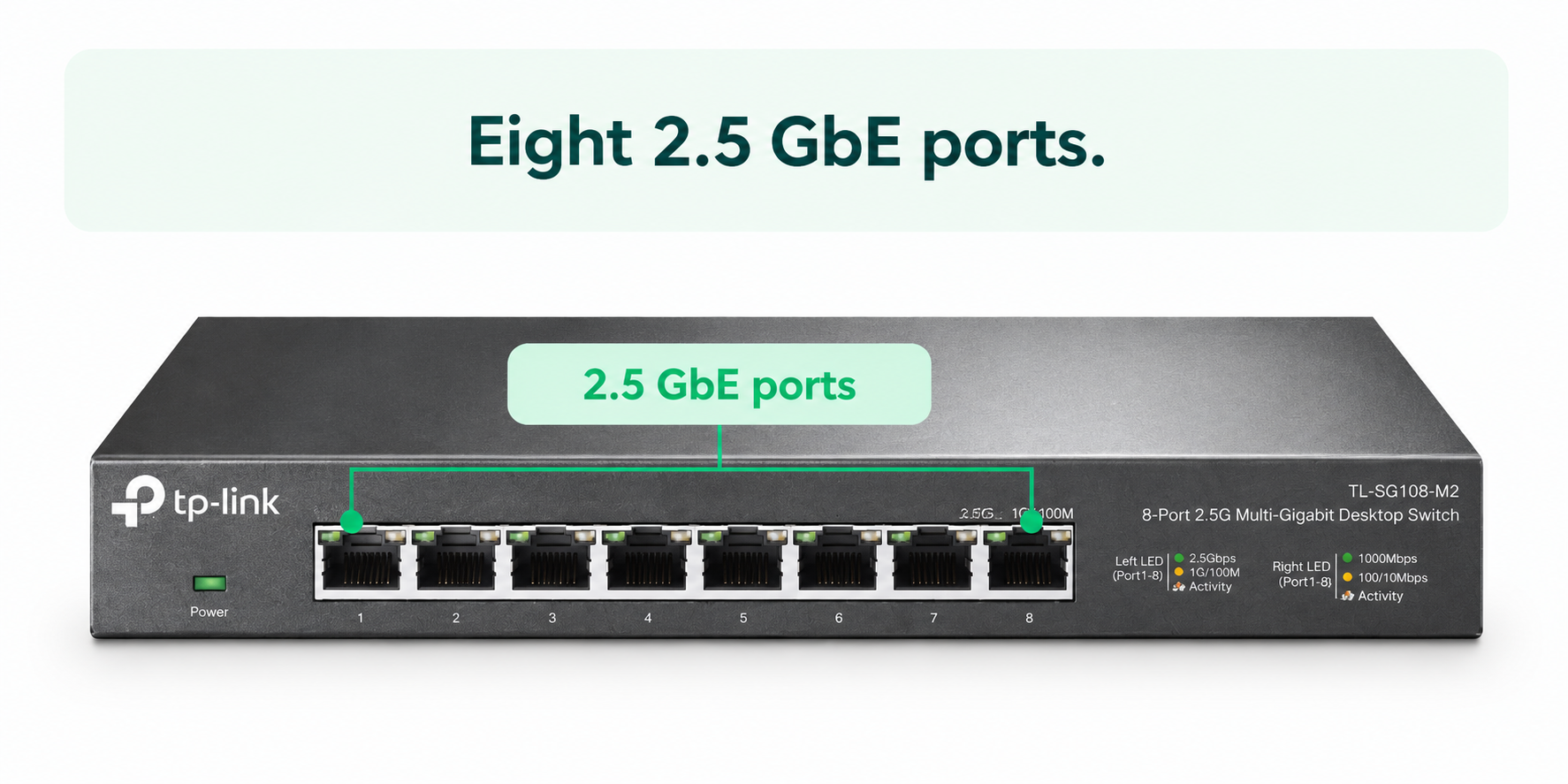
A switch with 1Gbps ports can still work on a Hyperfibre network. However, devices connected through those ports won’t individually access multi-gigabit speeds.
The same applies to cabling.
Older or lower-specification Ethernet cabling may limit the speeds you can reliably achieve. If multi-gigabit wired performance is important to your business, ask whoever manages your IT network to check your existing cabling and switches before the upgrade.
You don’t necessarily need to replace every cable or switch. Focus on where additional bandwidth will actually make a difference.
For example, a workstation regularly transferring huge media files may benefit from a multi-gigabit wired connection. A printer probably won’t.
4. Don’t forget about Wi-Fi
This is one of the easiest places to misunderstand a Hyperfibre upgrade.
Your internet plan speed and the speed a laptop gets over Wi-Fi are not the same thing.
Wi-Fi performance is affected by your access points or router, the device you’re using, distance, walls, interference, the number of connected devices and how your office network is designed.
That means you shouldn’t expect every employee to run a speed test over Wi-Fi and see the full speed of a 2Gbps or 4Gbps plan.
The bigger question is whether your Wi-Fi setup can distribute the available bandwidth effectively across your workplace.
Businesses with larger offices, lots of connected devices or areas with poor Wi-Fi coverage may want to review their access points or get multiples routers with mesh setup (see our eero routers!) at the same time as their Hyperfibre upgrade.
5. Check whether your devices can actually use the extra speed
When it comes to the upgrade, your laptops, desktops and other devices matter too.
A computer connected using a 1Gbps Ethernet adapter won’t suddenly get a 4Gbps wired connection because the internet plan has changed.
Likewise, older phones and laptops may support older Wi-Fi standards and achieve lower speeds than newer hardware. That doesn’t make Hyperfibre pointless. A 4Gbps connection doesn’t have to mean one computer downloading at 4Gbps. For a business, the bigger advantage can be having more bandwidth available across many people and applications at once.
Your team could be running video meetings, uploading large files, using cloud applications and completing backups simultaneously without every activity competing for the same limited connection.
6. Plan the installation around your business
Finally, think about the actual changeover.
Depending on what’s already installed at your premises, moving to Hyperfibre may require an upgraded ONT and technician visits.
That means it’s worth planning ahead if you’re moving office, approaching a busy trading period or have a date when the connection needs to be operational.
Before installation, confirm:
- whether your existing ONT is Hyperfibre capable
- whether a technician needs access to the premises
- where your router and networking equipment are located
- whether new network hardware needs to be installed first
- who will test your important systems after the connection goes live
- whether you need a contingency plan for any potential interruption
The more complex your network, the more useful it is to involve your IT provider or internal IT team early.
Do you need to upgrade everything?
The goal isn’t to make every device in the building capable of running at several gigabits per second. It’s to remove bottlenecks where they matter. A practical approach is to prioritise the parts of your network carrying the most traffic.
For example, that could mean upgrading the main router and network switch while leaving low-bandwidth devices alone. Or improving Wi-Fi coverage in busy areas while giving data-intensive workstations multi-gigabit wired connections.
Think about Hyperfibre as increasing the total capacity available to your business, rather than simply chasing the highest possible speed-test result on every device.
Ready to upgrade to Business Hyperfibre?
Voyager offers Business Hyperfibre plans from 1000Mbps to 4000Mbps, with symmetrical upload and download speeds, ready to support your business online activity now and as you grow. Having bought hundreds of businesses onto Business Hyperfibre, our team is well-versed at walking you through what you might need to consider, and any further questions you might have after this blog or during the move.
Get started by checking Business Hyperfibre availability at your address here, or talk to the Voyager team about what you’ll need to get your business ready.